|
page 55 |
 |
» 6. Admin site » g) Other information
- Case Studies
A page to enter and edit cases developed by the company, running the e-commerce shop, by
which the company wants to promote its developments vis-a-vis its clients. Consists of three
dynamic pages - one displaying the list of cases, one for editing a case and one for adding a new case.
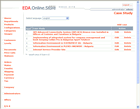
o List [screen]
This is the initial page when you start working with cases. A list of all cases is displayed and
links to Edit and Delete are available next to every case. The name of the case in the list is the
link to the Edit page. There is a link to Add Case page at the beginning of the list.
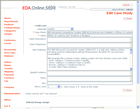
o Edit [screen]
ТFields to edit cases are displayed on this page and a link to Save. Forms to upload an
image of the detailed page of the case in the public site are also displayed.
There is a backward button to the list of cases.
o Add Case
A table of fields to enter details on the case is displayed on this page with a link to Save
function. There is a backward button to the list of cases. Upon saving the page transforms to Edit page.
|